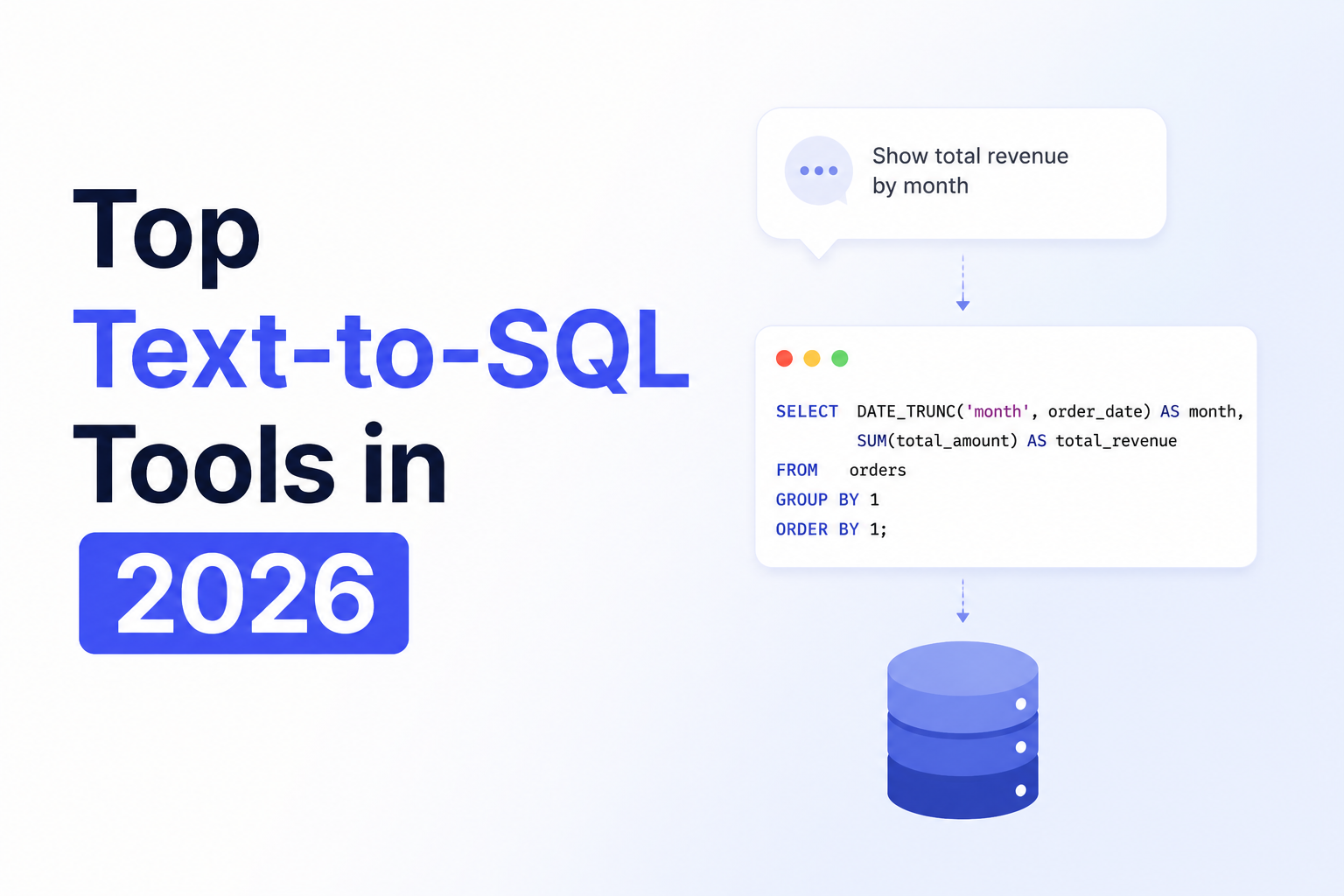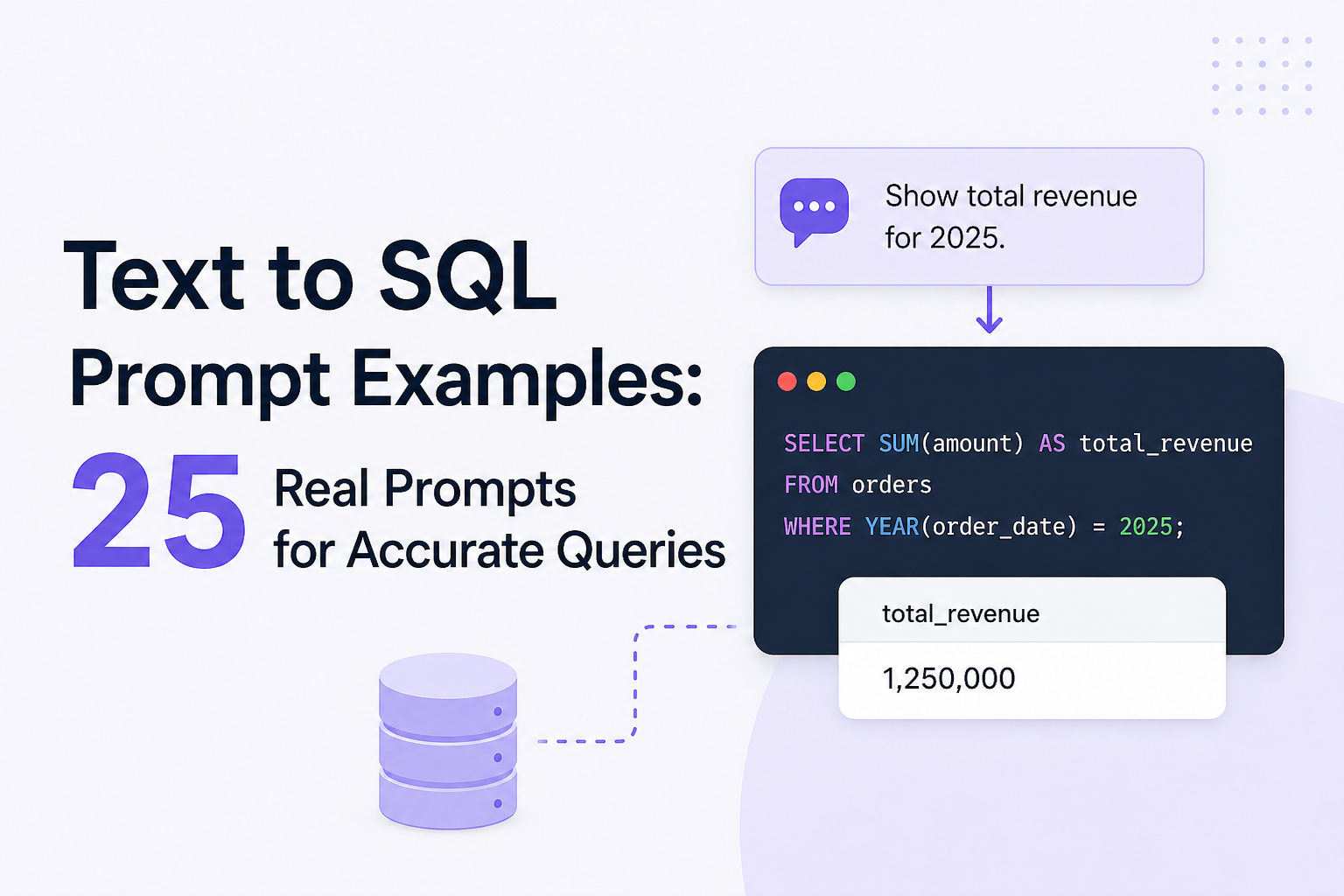
Text to SQL — the process of using AI to translate natural language inquiries into SQL — can transform the workflow of data-driven teams by giving everyone on the team access to high-quality insights about their data, regardless of their technological expertise. But it’s not as straightforward as it seems; prompt quality matters, and there are plenty of text to SQL prompt examples that can actually create more issues for your team than benefits.
Vague, incomplete, and overloaded prompts can all create issues in text to SQL and will eventually lead to inaccurate queries, missing joins, or mishandled business logic. The quality and accuracy of your text to SQL prompts are some of the most important factors in making the most of this process.
In this article, we’ll look at 25 real text to SQL prompt examples that actually work.
What Is Text-to-SQL?
- Definition (LLMs converting text to SQL).
- Use cases:
- BI tools
- Internal dashboards
- Chat-based analytics
- Mention risks of poor prompting.
Text-to-SQL refers to the process of using LLMs to transform natural language requests or commands into clear, executable SQL queries.
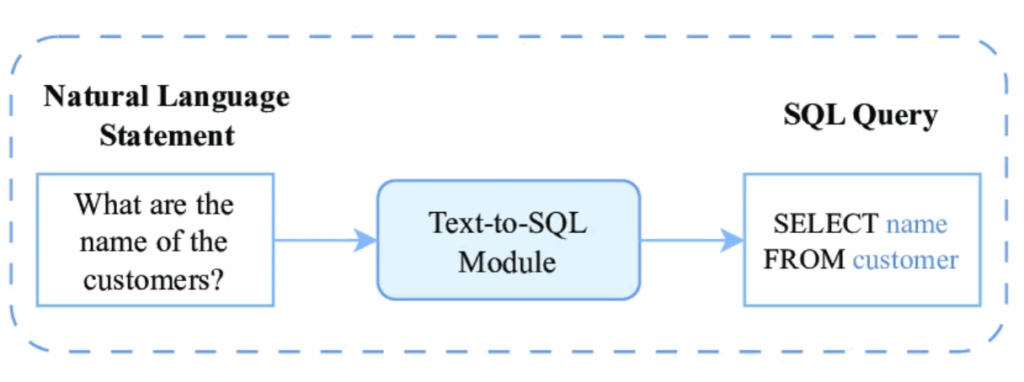
Text-to-SQL prompts give users the power to write plain English questions and directives that AI can translate into SQL syntax almost immediately, meaning that anyone on the team — regardless of their knowledge or experience in manually writing SQL — can have access to the data they need to make decisions.
AI SQL prompt engineering exists to bridge the gap between natural human language requests and complex structured data logic. It can empower teams with:
- Faster data insights
- Improved productivity across the team
- Democratized access to data
- Better, more informed decision making
The text-to-SQL process has three core components:
- Natural Language Input This is the user’s question regarding the data. It could be anything from a simple lookup to a complex request involving multiple conditions.
- Database Schema This includes the structural metadata of the database (e.g., tables, columns, etc.).
- Formal Output LLM SQL queries with correct syntax that return the exact data requested by the user.
Let’s take a look at some of the best use cases for text-to-SQL.
- BI Tools The text-to-SQL process is a great option for teams that need to extract business intelligence insights from databases, but don’t necessarily have SQL knowledge or developer resources.
- Internal Dashboards Users can expect fast query generation and more immediate insights in their dashboard for more efficient and effective decision making.
- Chat-based Analytics Text-to-SQL can give users the power to explore conversational data and other nuanced frameworks and inputs. We’ll look at some chat to SQL examples later in this article.
Many teams have been relying on text-to-SQL for as long as LLMs have been available to them. But the reality is that the process is not as foolproof as users might hope. The quality of the prompt can make or break the outcome of the process. Accurate SQL prompts are crucial to the success of the process.
A poor prompt can lead to an inaccurate and/or incomplete SQL query, making the data output risky to rely on for analysis purposes.
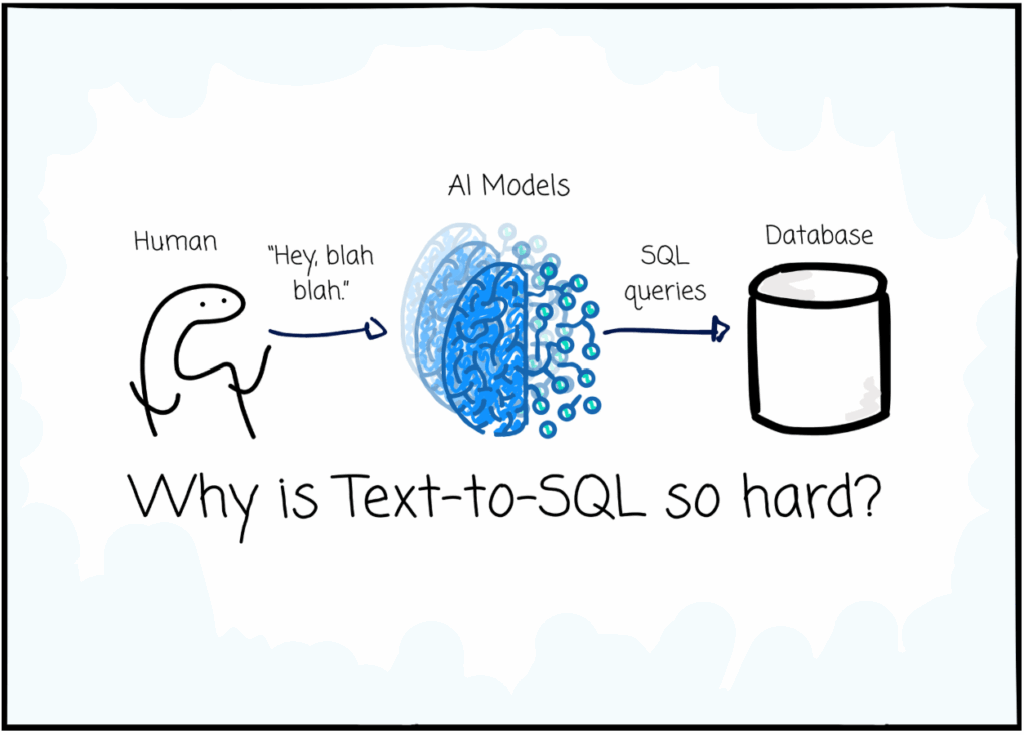
The image above is an exaggerated negative text to SQL example, but the parody rings true nonetheless: prompts that are too vague, too broad, or too overloaded might as well read “blah blah blah” to an AI model and will ultimately generate an ineffective output.
Poor prompting can lead to all sorts of data issues, including (but not limited to):
- Incorrect joins
- Inaccurate aggregations
- Hallucinated columns
Careful prompt design, combined with a text-to-SQL tool that can handle context and nuance, is critical for successful results.
Anatomy of a Good SQL Prompt
The primary object of text-to-SQL is to map human intent, expressed in messy and often ambiguous language, to the rigid, formal logic of a relational database.
If you look carefully, you’ll start to notice differences between good and bad natural language to SQL examples. Let’s break down the key elements of a strong, accurate SQL prompt.
- Clear Intent One of the most important aspects of a high-quality prompt is clarity of intent. Users need to be as explicit as possible in stating what precise outcomes they want from the database.
- Table/Schema Reference You also need to reference which schemas should be used in the output (e.g., tables, columns, etc.).
- Filters/Conditions Be sure to include applicable time ranges, parameters, thresholds, etc. when writing your directive — again, the more explicit, the better.
- Output Format Make it clear in your request how you’d like your output to be formatted in terms of grouping or sorting results.
Take a look at the following text-to-SQL examples. Note the differences between a weak prompt and a strong one.
Weak Text-to-SQL Example: “Show revenue.”
Strong Text-to-SQL Example: “Calculate total revenue per month for 2025.”
Notice the way the improved prompt adds clarity, thresholds, and parameters — this prompt will increase the accuracy of the output.
25 Text to SQL Prompt Examples (Core Section)
Here are 25 real-world, high-quality text-to-SQL prompt examples.
Basic Queries
The first five prompts we’ll look at are basic natural language to SQL examples. These are typically the most straightforward requests, applying only simple filters to the database.
- Prompt: “Select all users.”
This prompt would generate the following SQL syntax.
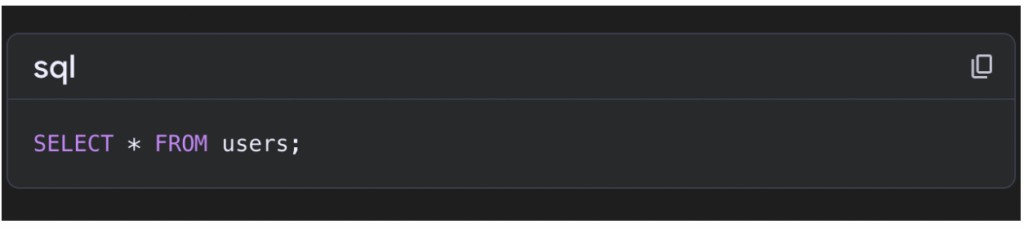
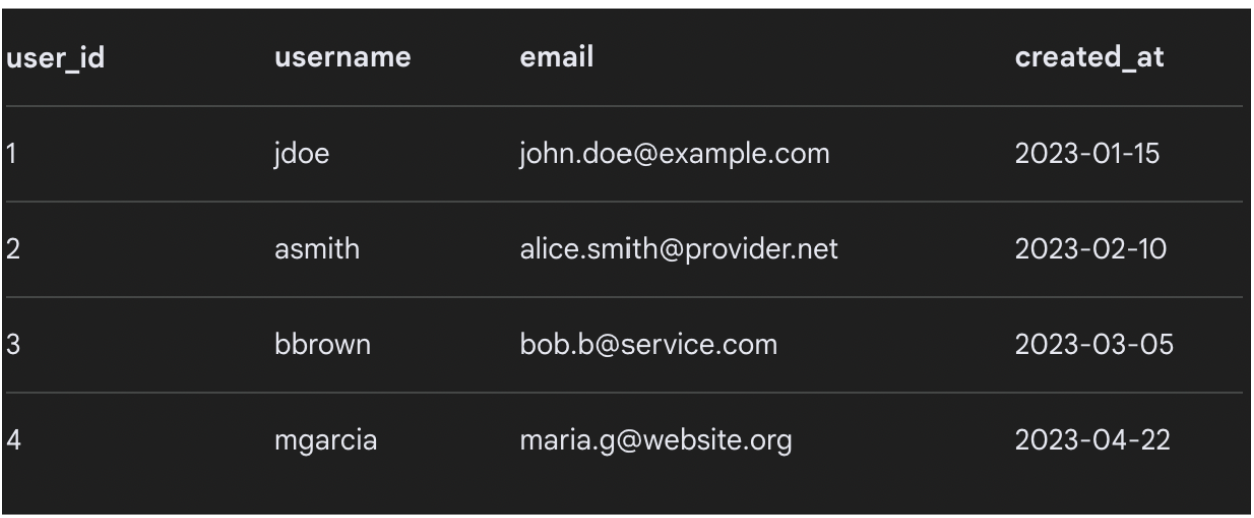
The result would look something like the output below.
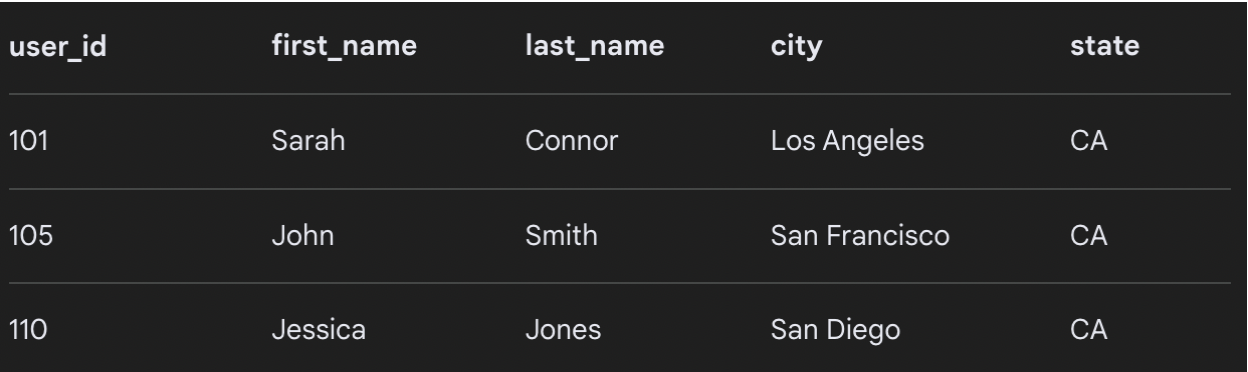
- Prompt: “Find all users in California.”
Here’s the SQL query.
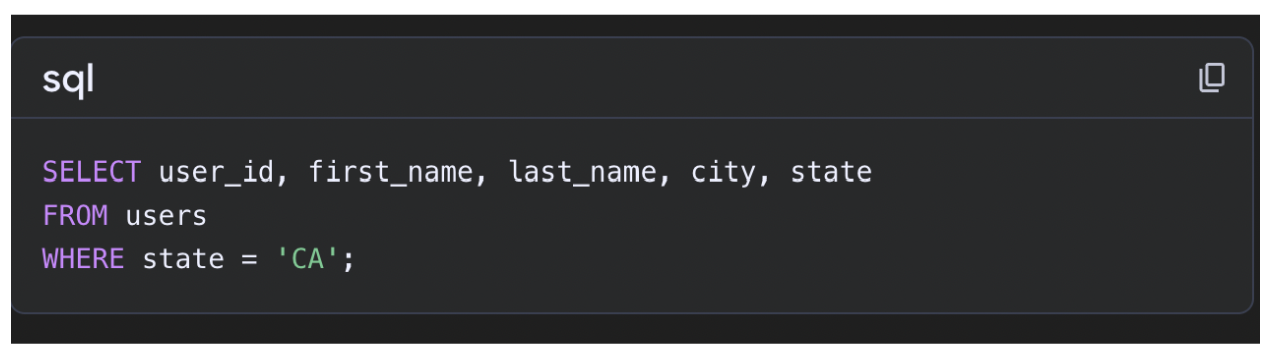
See the output below.
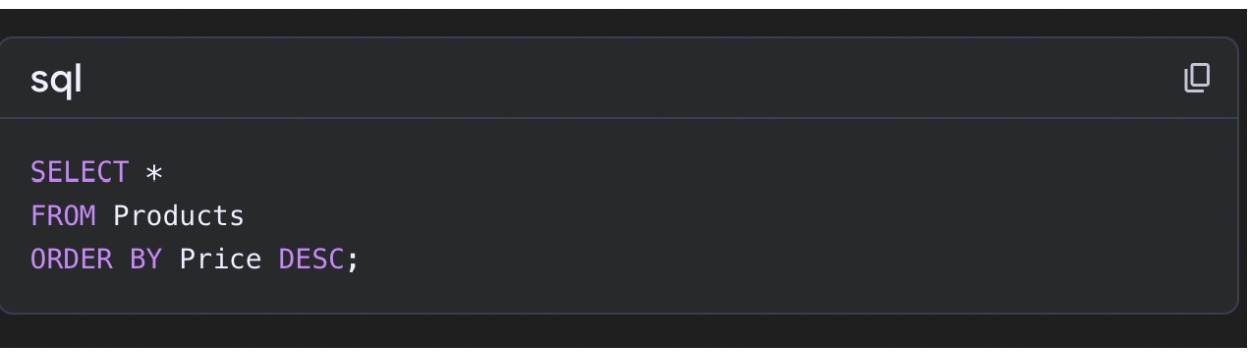
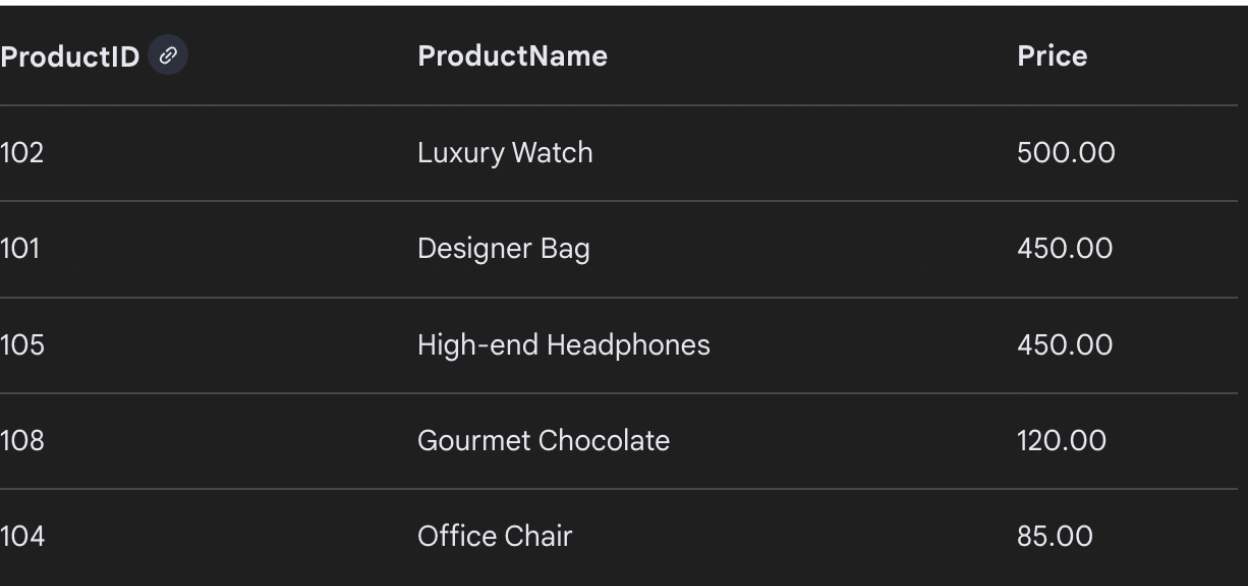
- Prompt: “List all products sorted by price, highest to lowest.”
The SQL query for this prompt would appear as shown below.
An example output would appear as follows.
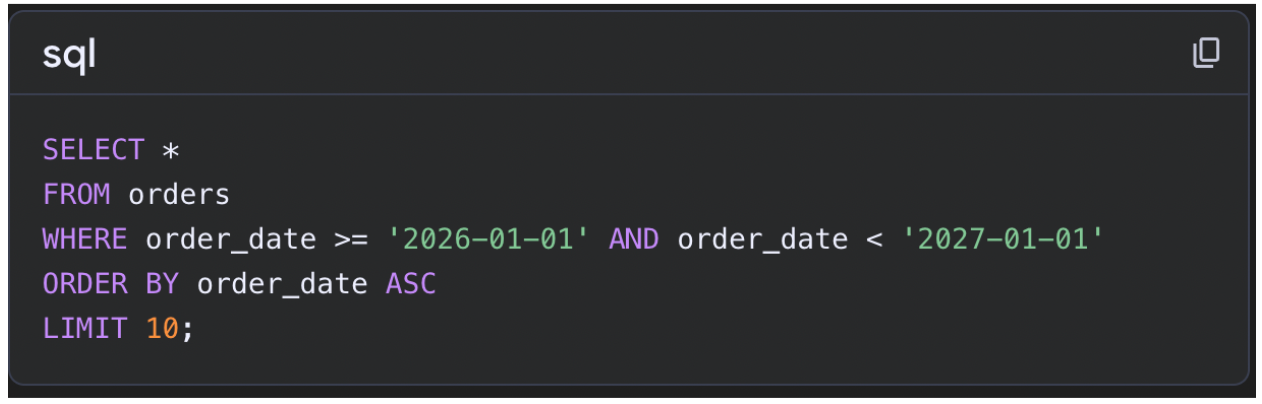
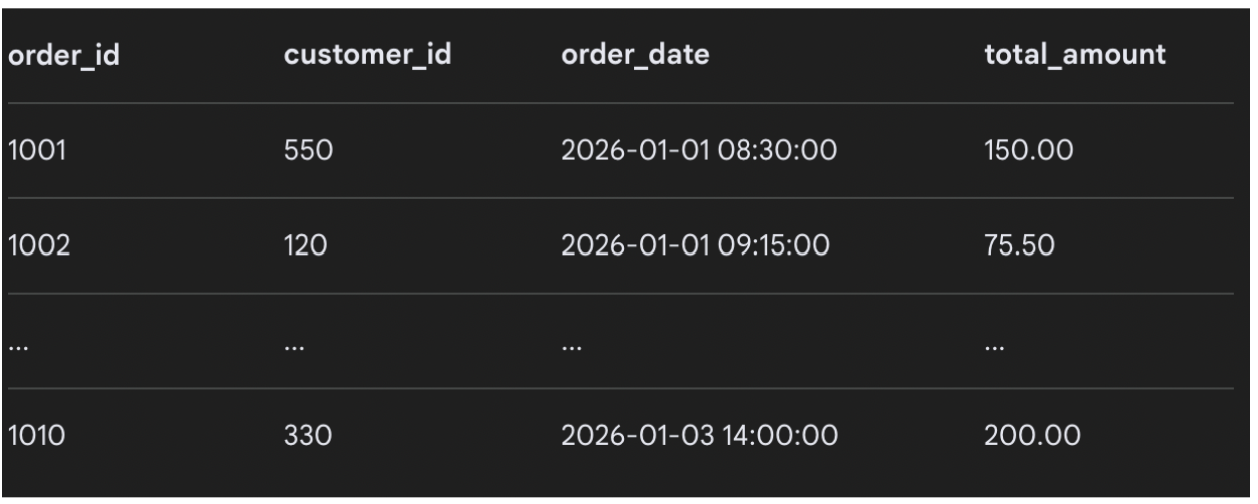
- Prompt: “Show me the first 10 orders in 2026.”
See below for the SQL query for this command.
An example of an output for this query is shown below (orders 1003 – 1009 omitted for the sake of image size).
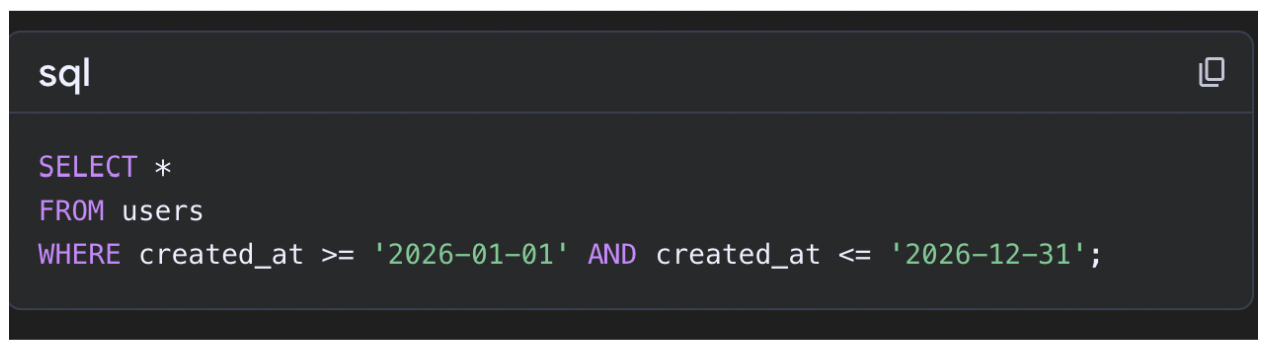
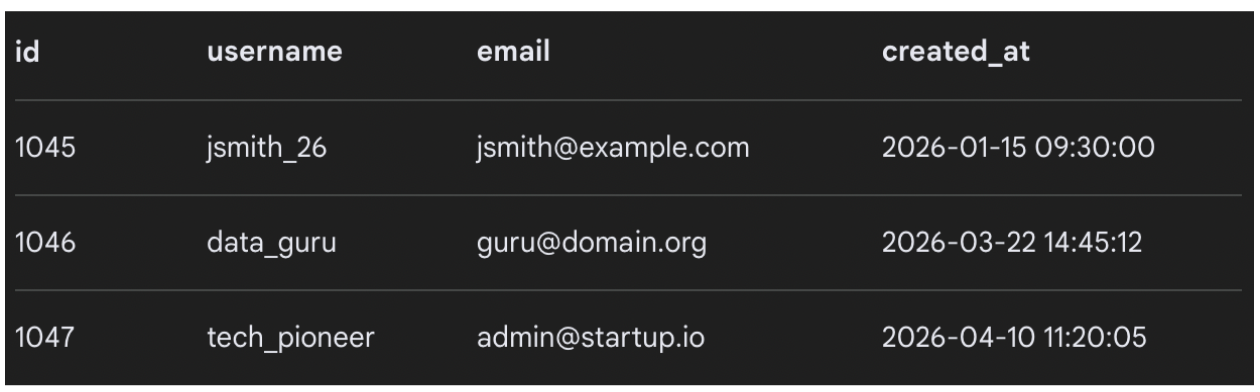
- Prompt: “Show users added in 2026.”
Here’s the SQL query for this prompt.
Below is an example of an output that answers the query, including the users’ IDs and the dates they were added.
Aggregations
Aggregation requests require summary statistics or group-level data like COUNT, SUM, and AVG.
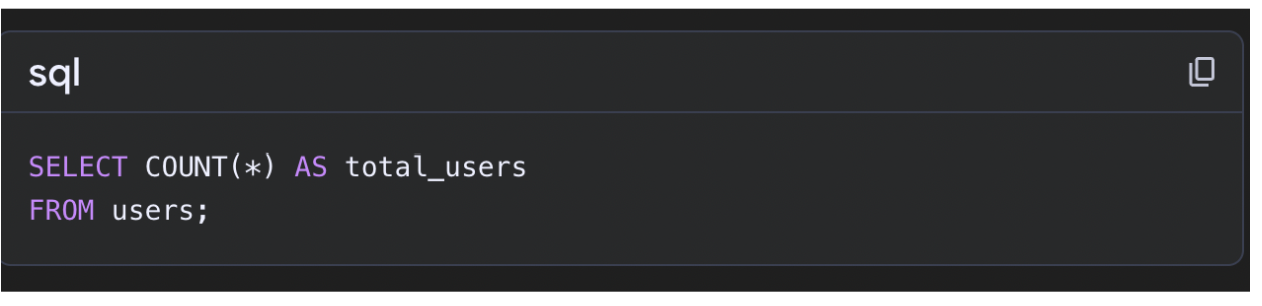
- Prompt: “Count total number of users.”
Here’s the SQL query that matches the prompt.
And a sample output is shown below.

Prompt: “Total revenue for 2025.”
The SQL command for this prompt is as follows:
SELECT SUM(amount) AS total_revenue
FROM orders
WHERE YEAR(order_date) = 2025;
The output would be generated similar to the one shown below:
| total_revenue |
|---|
| 1,250,000 |
Prompt: “Average order value in 2025.”
Here’s the SQL syntax for this request:
SELECT AVG(amount) AS avg_order_value
FROM orders
WHERE YEAR(order_date) = 2025;
And here’s an example of how the output might look:
| avg_order_value |
|---|
| 85.50 |
Prompt: “Number of users per country.”
See below for the SQL query for this prompt:
SELECT country, COUNT(*) AS user_count
FROM users
GROUP BY country;
And the output would be shown as follows:
| country | user_count |
|---|---|
| USA | 1200 |
| UK | 800 |
| Canada | 500 |
Prompt: “Monthly revenue in 2025.”
See below for the SQL syntax for this prompt:
SELECT MONTH(order_date) AS month, SUM(amount) AS revenue
FROM orders
WHERE YEAR(order_date) = 2025
GROUP BY MONTH(order_date)
ORDER BY month;
This query would generate an output like the text-to-SQL example shown below:
| month | revenue |
|---|---|
| 1 | 100,000 |
| 2 | 120,000 |
| 3 | 110,000 |
Joins
Some text-to-SQL examples require data from multiple tables, in which the system needs to generate a JOIN clause to link them.
Prompt: “Show me orders by value in January 2026.”
Here’s a look at the SQL syntax for this request:
SELECT o.order_id, o.amount, u.name
FROM orders o
JOIN users u ON o.user_id = u.id
WHERE MONTH(o.order_date) = 1 AND YEAR(o.order_date) = 2026
ORDER BY o.amount DESC;
And here’s an easy-to-read output for that join command:
| order_id | name | amount |
|---|---|---|
| 101 | John | 500 |
| 102 | Sarah | 450 |
Prompt: “Users without orders in 2026.”
Here’s the SQL code for this prompt:
SELECT u.id, u.name
FROM users u
LEFT JOIN orders o ON u.id = o.user_id AND YEAR(o.order_date) = 2026
WHERE o.id IS NULL;
And below is an example of the output:
| id | name |
|---|---|
| 5 | Alex |
| 9 | Maria |
Prompt: “Order details with customer name and product name.”
See below for the SQL syntax for a prompt like this one:
SELECT o.order_id, u.name AS customer_name, p.product_name
FROM orders o
JOIN users u ON o.user_id = u.id
JOIN products p ON o.product_id = p.id;
An example of the output is shown below:
| order_id | customer_name | product_name |
|---|---|---|
| 201 | John | Laptop |
| 202 | Emma | Phone |
Prompt: “Revenue by customer.”
See below for the code for this prompt:
SELECT u.name, SUM(o.amount) AS total_revenue
FROM users u
JOIN orders o ON u.id = o.user_id
GROUP BY u.name;
Below is a sample output for this text-to-SQL example:
| name | total_revenue |
|---|---|
| John | 2000 |
| Emma | 1500 |
Prompt: “Orders with user emails.”
Below is the text to SQL code for this plain English prompt:
SELECT o.order_id, u.email, o.amount
FROM orders o
JOIN users u ON o.user_id = u.id;
And a sample output is as follows:
| order_id | amount | |
|---|---|---|
| 301 | [email protected] | 300 |
| 302 | [email protected] | 250 |
Advanced Queries
Advanced queries require multi-step logic involving multi-table joins, subqueries, and window functions.
Prompt: “Second highest salary in sales department.”
Here’s how this prompt would appear in SQL syntax:
SELECT MAX(salary) AS second_highest
FROM employees
WHERE department = 'Sales'
AND salary < (
    SELECT MAX(salary)
    FROM employees
    WHERE department = 'Sales'
);
And the output would appear something like the image below:
| second_highest |
|---|
| 9000 |
Prompt: “Running total of revenue from January 1, 2026 to present.”
See below for the code for this text-to-SQL example:
SELECT order_date,
       SUM(amount) OVER (ORDER BY order_date) AS running_total
FROM orders
WHERE order_date >= '2026-01-01';
The output is shown below:
| order_date | running_total |
|---|---|
| 2026-01-01 | 200 |
| 2026-01-02 | 450 |
Prompt: “Best 3 products by number of products sold.”
Here’s an example of how this natural language request would appear in SQL:
SELECT product_id, COUNT(*) AS total_sold
FROM orders
GROUP BY product_id
ORDER BY total_sold DESC
LIMIT 3;
And a sample output would appear as follows:
| product_id | total_sold |
|---|---|
| 10 | 500 |
| 8 | 450 |
| 3 | 400 |
Prompt: “Sort users by revenue generated, from highest to lowest.”
See below for the SQL for this prompt:
SELECT u.name, SUM(o.amount) AS revenue
FROM users u
JOIN orders o ON u.id = o.user_id
GROUP BY u.name
ORDER BY revenue DESC;
A sample output is shown below:
| name | revenue |
|---|---|
| John | 3000 |
| Emma | 2500 |
Prompt: “Show me a list of customers who spend more than average.”
Here’s a look at this text-to-SQL example in code:
SELECT u.name, SUM(o.amount) AS total_spent
FROM users u
JOIN orders o ON u.id = o.user_id
GROUP BY u.name
HAVING total_spent > (
    SELECT AVG(amount) FROM orders
);
And a sample output is shown below:
| name | total_spent |
|---|---|
| John | 3000 |
| Emma | 2500 |
Business Use Cases
Here are a few text-to-SQL prompt examples that might be used in real-world business use cases.
Prompt: “Monthly recurring revenue.”
Here’s how the code looks for this prompt:
SELECT MONTH(subscription_date) AS month,
       SUM(monthly_fee) AS mrr
FROM subscriptions
GROUP BY MONTH(subscription_date);
The output is shown below:
| month | mrr |
|---|---|
| 1 | 50,000 |
| 2 | 55,000 |
Prompt: “Active users in the last 30 days.”
The code for this prompt is as follows:
SELECT COUNT(DISTINCT user_id) AS active_users
FROM user_activity
WHERE activity_date >= CURRENT_DATE - INTERVAL 30 DAY;
A sample output is shown below:
| active_users |
|---|
| 4200 |
Prompt: “Names of churned customers in 2025.”
Here’s how the SQL syntax would appear for this request:
SELECT name
FROM customers
WHERE churn_date IS NOT NULL
AND YEAR(churn_date) = 2025;
Shown below is an example of how the output may appear:
| name |
|---|
| Alex |
| Maria |
Prompt: “Retention cohort by signup month.”
See below for the code that matches this prompt:
SELECT signup_month,
       COUNT(user_id) AS users_retained
FROM cohorts
GROUP BY signup_month;
The output would appear as follows:
| signup_month | users_retained |
|---|---|
| Jan 2025 | 300 |
| Feb 2025 | 280 |
Prompt: “Revenue by subscription plan type.”
Here’s the SQL syntax for this prompt:
SELECT plan_type, SUM(amount) AS revenue
FROM subscriptions
GROUP BY plan_type;
The output for this text-to-SQL example is shown below:
| plan_type | revenue |
|---|---|
| Basic | 100,000 |
| Premium | 200,000 |
Prompt Optimization Techniques
The following techniques will help you optimize your process and generate the most accurate text to SQL prompts possible.
- Add Schema Context & Explicit Column Names One way to refine your prompts is to add schema context, such as table names, columns, and types of data. Adding schema context helps prevent hallucinations and gives context for how datasets relate to one another.
- Define Time Ranges Clearly Putting parameters around the timeframe of data you’re interested in will improve the AI SQL prompt engineering process.
- Avoid Ambiguity The more specific and explicit you are in your prompt, the better your output will be. This helps guide the LLM toward the exact data you need, rather than giving it room to guess or try to make meaning on its own out of a vague prompt.
- Iterative Prompting If you don’t get the output you’re looking for with your initial prompt, it’s recommended to refine your request to make it more specific. Always confirm the accuracy of the output before relying on it for analysis.
Let’s look at a text-to-SQL prompt example that uses some of these optimization techniques over several iterations.
Show revenue → Show monthly revenue → Show monthly revenue for 2025 using the orders table
Common Prompt Mistakes
The following oversights and errors will reduce the accuracy of your LLM SQL queries.
- Vague Instructions SQL isn’t great at deciphering human context or assumptions. A prompt that’s too vague could lead to an output that doesn’t deliver the data you actually need.
- Missing Schema Info Without specific schema context, the SQL query may end up pulling data from an incorrect table or column.
- Overloaded Prompts On the other hand, a prompt with too many specifications — too much schema context or other excessive noise — increases the risk of hallucinations and inaccurate outputs.
- Ambiguous Metrics Ambiguity is often users’ downfall in text-to-SQL requests. A request without specificity can lead to a query that’s syntactically correct but semantically inaccurate. This is sometimes referred to as a “silent failure” — a situation in which the LLM guesses the wrong column or table or makes the wrong calculation.
- No Constraints A prompt with no constraints can create all kinds of issues, including security concerns, hallucinations of non-existent columns, or runaway queries. A request without constraints is susceptible to unauthorized DELETE or DROP commands.
Use the prompt optimization techniques outlined in this article to avoid these costly mistakes.
Tools for Text-to-SQL Workflows
Teams that want to maximize their text-to-SQL workflow understand that it’s not just about writing good prompts; the key to getting it right is finding the right combination of AI tools, data infrastructure, and data orchestration tools.
Fortunately, there are plenty of options that can help teams execute their AI SQL prompt engineering process. This space is expanding quickly and there are a diverse range of tools available.
AI Models
OpenAI models are a common choice for text-to-SQL thanks to their ability to interpret natural language requests and transform them into syntactically-accurate SQL code in a range of dialects (e.g. Snowflake, MySQL, etc.).
As robust as these tools can be, however, they still require careful prompt constraints and specificity, as well as post-generation validation for best results.
Data Platforms
The data platform your team uses is the engine for effective text-to-SQL workflows. Even the most accurate SQL syntax can’t offer valuable insight if the data layer it connects to is lacking or faulty.
Here’s how the process looks in action.
Prompt → SQL → Data Platform → Analytics & Insight
If the data platform is subpar, the equation falls apart.
Some cloud providers like Google Cloud are making moves to embed text-to-SQL ability directly into their data systems. This offers users a naturally strong integration between the tool and the data infrastructure, making communication between the two more streamlined and intuitive.
Workflow / Pipeline Tools
Your data pipeline tool can be another make-or-break factor in whether your text-to-SQL workflows succeed.
It’s easy enough to generate accurate text-to-SQL commands on a one-off basis; the teams leveraging this process most successfully have figured out how to do it reliably, accurately, and at scale with the help of a data orchestration tool.
Apache Airflow is a traditional workflow orchestration tool that excels in scheduling data pipelines and running batch SQL tasks. It can execute queries on a schedule and run validation scripts to ensure accurate SQL prompts.
That being said, this tool is not designed specifically for prompt workflows. It’s an extremely code-heavy platform, requiring custom logic for LLM integration.
Dagflux is another workflow tool that, unlike Apache, is built specifically for AI-driven workflows — making it especially productive for text-to-SQL systems. It’s built for text-to-SQL prompts and interprets them as a structured component of the pipeline.
Let’s look at some of the key features that make Dagflux a seamless tool for text-to-SQL:
- Prompt Templates The platform allows users to create reusable prompt templates and standardize prompt structure across teams for improved consistency and more efficient workflows.
- SQL Validation Dagflux automatically checks SQL scripts before execution to correct errors like invalid columns, missing joins, and unsafe operations.
- Retry Logic At some point or another, your text-to-SQL will fail. Dagflux is built to automatically refine the prompt and re-rerun generation without manual input.
Ultimately, many teams choose to use a hybrid approach of both open-source and commercial solutions for text-to-SQL.
Best Practices for Accurate SQL Generation
Generating text-to-SQL outputs can give teams a lot of leverage when it comes to gaining insight from their data. But without SQL prompt best practices in place, it has the potential to create more problems than solutions.
The following ideals can help teams create an accurate, reliable, and repeatable system for text-to-SQL.
Always Validate Outputs
LLMs are not necessarily built for accuracy. For as powerful as they are at digesting data, they are constantly at risk of relying too much on pattern and not enough on correctness.
Every query your team generates should be passed through a series of validations before it gets sent to your database.
- Syntax & Schema Checks Does the query run, and is it looking at real columns/tables?
- Permission Checks Is the query allowed?
- Cost Checks Will it run through massive data tables?
Executing a standard set of validation checks will save teams a lot of time and heartache in the long run.
Use Test Datasets
It’s a good idea to run all of your queries through a test database before executing it within your actual databases. Here’s how this could look in practice:
- Generate SQL.
- Run the query against the test dataset.
- Validate results.
- Promote to full-scope use.
Validating a query against a test dataset can help catch issues like logic errors and accidental data exposure before they become problematic.
Limit Query Scope
Some teams jump headfirst into text-to-SQL without consideration to cost. Unbounded queries can trigger full table scans, which run the risk of increasing costs and slowing down your systems.
Query constraints like time filters and column specification can help mitigate these concerns. Teams can achieve this by adding constraints directly into their prompts, and by adding a validation layer that rejects unbounded queries as a failsafe.
Add Guardrails (No DELETE/UPDATE)
LLMs are not built for judiciousness; instead, they can and will execute any valid SQL — including destructive ones.
To prevent data mishaps, make sure everyone on your team is on the same page about non-negotiable guardrails:
- Allow only read-only queries (SELECT)
- Explicitly block change functions like DELETE, UPDATE, INSERT, and DROP
Most teams have no need to allow write operations from LLM-generated SQL.
Log Prompts and Outputs
Logging prompts and outputs may sound tedious, but it will ultimately provide your team an incredibly valuable dataset. Keeping track of your inputs and outputs allows you to:
- Correct inaccurate queries
- Identify failure patterns
- Improve prompt templates over time
- Optimize prompts for accuracy and cost
Here’s what most teams prioritize in their log record:
- Original plain English query
- Final prompt sent to the LLM
- Generated SQL
- Execution result (success/failure)
- Performance metrics
This is another area where Dagflux excels; with centralized prompt tracking and observability, users get full pipeline transparency and automatic record-keeping.
Real-World Applications
Your team will get the most leverage from text-to-SQL when it’s implemented as a core component of your data workflow, rather than a one-off query generator.
Let’s take a look at three production-grade, end-to-end workflows in real-world scenarios.
SaaS Analytics
SaaS teams rely on real-time data analytics to make informed decisions. But most teams aren’t stacked with SQL-savvy members, and relying on developers to generate business insights is an inefficient use of resources.
Here’s an example of a SaaS data request that can be effectively executed by text-to-SQL.
Example user input: Top customers by revenue.
Structured prompt with schema context:
Generated SQL:
End-to-end workflow:
User question → Prompt → SQL → Data warehouse → Dashboard
This workflow gives all users access to the data they need — not just the ones with data coding expertise.
Chat-Based BI Tool
Chat-based analytics tools are one of the most common use cases for text-to-SQL. Here’s how it looks in a real-world example:
Example user input: Revenue last quarter
Prompt enrichment:
SQL Generation:
From there, the prompt executes and returns outputs via a chart or KPI card.
End-to-end workflow:
Prompt → Refined SQL → Insights
This is a great example of how prompt refinement can create significantly better results in the output.
AI Data Pipeline
While text-to-SQL has been used in dashboards for a while now, its prevalence in data pipelines is growing. Users can use structured prompts to automatically drive data transformations.
Example user input: “Create a daily summary of user signups grouped by country.”
SQL Transformation:
The query can then be scheduled and created into a table.
End-to-end workflow:
Prompt-driven Transformations → Validated Execution
The bigger the pipeline, the more difficult it becomes to manage prompts. A tool like Dagflux can take user prompts and turn them into structured systems for reliable and scalable outputs.
Teams that are ahead of the game with text-to-SQL have figured out how to embed AI into their data workflows.
Challenges in Text-to-SQL
Here are some of the issues teams run into when they aren’t careful with their text-to-SQL process.
- Schema Complexity Massive databases can confuse AI models and create challenges in generating efficient queries for complex joins. To combat this, use the prompt optimization techniques outlined in this article (i.e., use explicit table/column names; add schema context; clearly define timeframes).
- Ambiguous Language LLM research has shown that 20% of user questions “are problematic, including but not limited to ambiguous and unanswerable questions.” Remember to make your prompt requests specific and constrained. Tools like Dagflux that are built to handle the natural nuance and ambiguity of human language can help bridge the gap.
- Scaling Prompts The text-to-SQL process won’t produce tangible benefits when it’s treated like a one-off task. Many teams fail to get this kind of workflow off the ground if they aren’t able to systemize and scale the way it’s deployed across the team.
- Accuracy vs. Speed While it’s true that teams need access to up-to-the-minute data insights, speed at the cost of accuracy can be detrimental. Be sure to include validation checks within your process; a tool with built-in validations, like Dagflux, can help teams balance the need for ultra-fast outputs with non-negotiable accuracy.
Trends in Text-to-SQL in 2026
As text-to-SQL becomes more commonplace, keep an eye on some of the trends that are giving teams an edge.
- Schema-aware LLMs Schema-aware LLMs inherently understand database structure, giving them the ability to generate more accurate SQL queries.
- Prompt Templates / Libraries Teams that have a standardized way of generating queries are way ahead of the curve. Prompt templates and libraries allow users to reuse proven formats that consistently produce valid outputs.
- Real-time Query Generation This gives users the ability to deliver questions, generate SQL, and get responses almost instantaneously. Live dashboards and chat-based analytics rely on real-time query generation for data-processing without delays commonly encountered in batch processing.
- AI Validation Layers AI-driven tools like Dagflux leverage the power of AI to automatically check queries for errors and unsafe operations before they generate ineffective outputs. This feature saves users time, improves reliability, and can help prevent costly mistakes.
Conclusion
Text-to-SQL is a powerful tool for helping teams access data insights, but it’s only as effective as the prompts behind it. Structured, context-rich prompts are the key to making this process work for your organization.
Tools like Dagflux empower users to build libraries of reusable LLM SQL queries, giving them immediate access to text-to-SQL prompt examples that are proven to generate accurate and successful outputs. With a platform like Dagflux in your toolbox, your team can reliably scale the text-to-SQL process for continuous real-time access to data analytics that drive informed decision making.