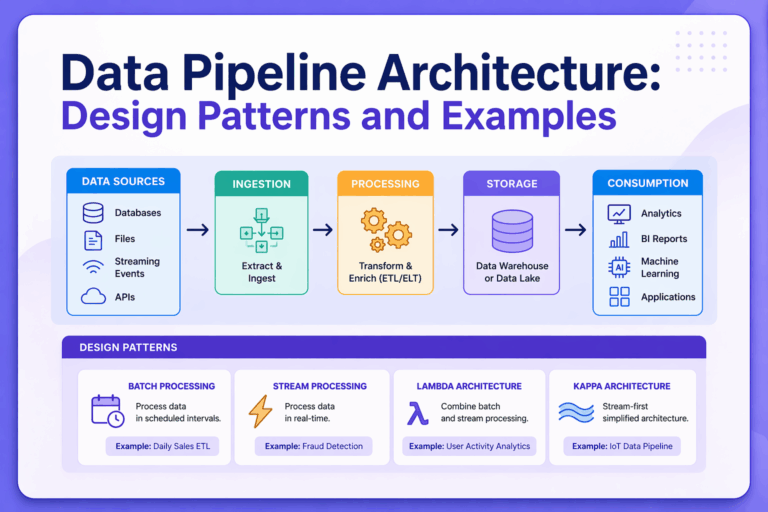
A data pipeline consists of processes that move and transform raw data from various sources into a data store, such as a data warehouse or data lake. A data pipeline architecture provides a blueprint for transferring and processing data from source to destination.
Organizations today collect a large amount of data from a variety of sources, but they need to process and transform it to get meaningful insights. A well-designed data pipeline architecture simplifies data analysis for business intelligence. It also makes it easy to scale systems without redesigning everything, and improves reliability with decoupled services, checkpoints, and built-in retries. For a long time, data pipelines were mostly based on the batch ETL model, and it worked fine when insights could wait. However, many modern systems today require real-time data processing and efficient AI-ready data flows for quick decision-making. This article will cover core components, different types, design patterns, and examples of data pipeline architecture.
What Is Data Pipeline Architecture?
A data pipeline architecture is the blueprint or structured design of systems that move and transform data. It details how the data is extracted from data sources (APIs, databases, etc.), its expected behavior, how and when the data is transformed (through filtering and aggregations), and how it is loaded into storage. The architecture also defines how the data is made available for consumption, such as for analytics, dashboards, and ML models.
Real-world data pipelines are usually highly complex, consisting of various interdependent processes. They are not as straightforward as moving data from a source to a target destination. Most pipelines require data from multiple sources. The extracted data may need to be organized and combined either before or after loading, depending on the pipeline design.
There are two common approaches for how pipelines handle data: ETL and ELT. In both approaches, the data is first extracted from source systems, but the difference lies in when and where the transformation happens.
ETL stands for Extract, Transform, Load, which means the data is first transformed before it is loaded. In contrast, ELT stands for Extract, Load, Transform, which means the data is first loaded into a storage system, such as a data warehouse, and then transformed later.
Traditional systems mostly use ETL, while ELT is widely used in modern architectures, but it requires a scalable destination, such as BigQuery or Snowflake, to run transformations.
Core Components of a Data Pipeline Architecture
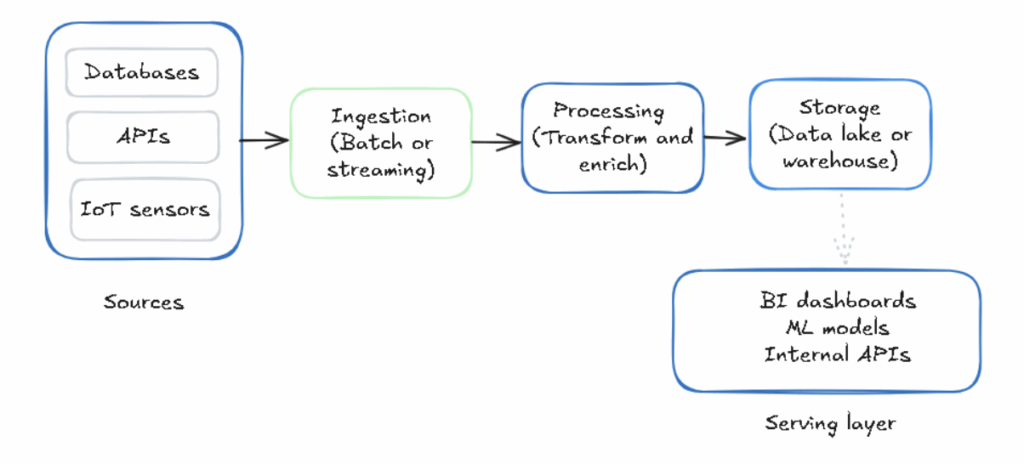
Data pipeline designs can vary, but most data pipeline architectures have a common set of core components. The diagram below shows these core components:
Data Sources
Organizations have huge amounts of data from a variety of sources, such as databases (SQL/NoSQL), APIs, IoT sensors, SaaS applications, application logs, event streams, message queues, and files (CSVs and JSONs). The data pipeline architecture starts from these data sources.
Ingestion Layer
This layer collects raw data from different sources and ingests it into the pipeline. There are two main ways to ingest data: batch vs streaming pipelines. How you ingest data impacts latency and load.
Batch ingestion processes data periodically at specified intervals, such as every hour or night. It’s simple to implement and makes it easy to process large volumes of data. Streaming ingestion, on the other hand, processes data continuously in real-time as it is received from various sources. It’s helpful for real-time analysis.
Processing Layer
Since the ingested data is in raw form, it needs to be transformed into usable information. At this step, the data is cleaned (schema validation, null handling, etc.), filtered, aggregated, and enriched to improve its quality. Processing can happen before or after data is stored, depending on pipeline design (ETL or ELT).
Storage Layer
At this stage, the data is stored in a data warehouse (Snowflake, BigQuery, Redshift), data lake (S3, GCS, Azure Data Lake), or a lakehouse (Databricks Delta Lake, Apache Iceberg). Most businesses today opt for cloud storage to make all data from various sources easily accessible for analysis.
Serving Layer
This is the final stage where data is delivered to end-users or systems, such as BI dashboards, analytics tools, ML training pipelines, real-time inference endpoints, and internal APIs.
Types of Data Pipeline Architectures
Batch Processing Architecture
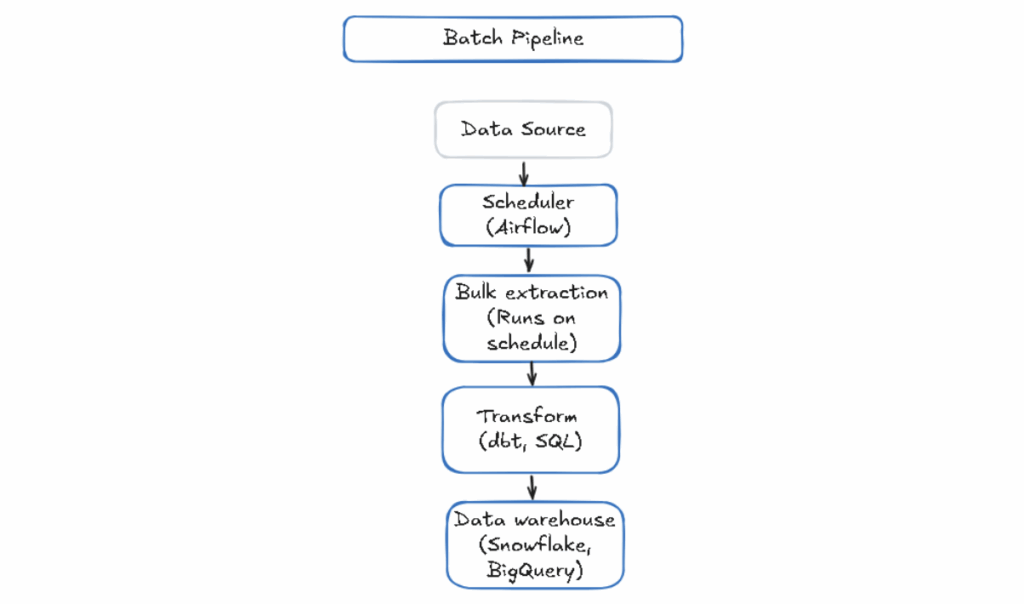
In batch processing, large amounts of data are processed in fixed-size batches at scheduled intervals, such as every hour or every night. The data from each batch is processed as a whole. Batch processing makes it easy to handle huge amounts of data by splitting it into chunks. It is suitable for historical analysis, billing calculations, and end-of-day reconciliation.
While this architecture is simple and predictable, it’s not suitable for applications or systems that need real-time data or quick analysis.
The diagram below shows how batch processing works:
Real-Time / Streaming Architecture
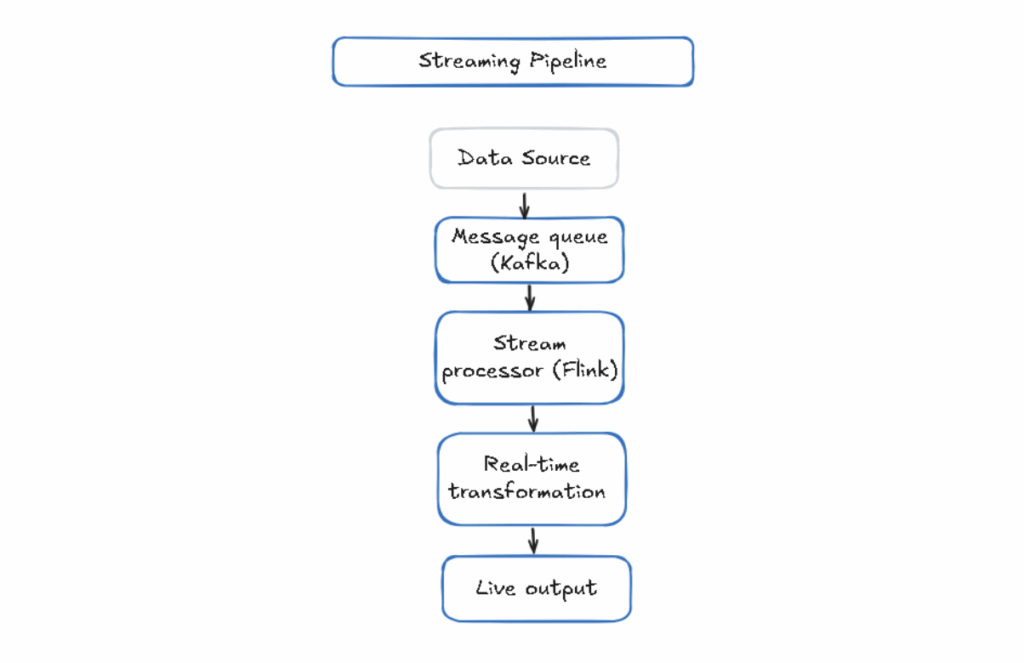
Streaming architecture processes data in real-time as it is generated. It processes data from different sources continuously and allows for data analysis in real-time. Streaming processing is useful for applications that need real-time data, such as live analytics, fraud detection in banking transactions, real-time dashboards, network traffic monitoring, and triggering alerts based on collected data.
However, real-time data pipeline architecture is more complex than batch architecture. You need systems that can handle high-throughput data streams, fault tolerance, and distributed processing.
Fortunately, tools like Apache Kafka make streaming processing easier as they are built specifically for it.
The diagram below shows how streaming architecture works:
Lambda Architecture
Lambda architecture is a hybrid approach that combines both batch and streaming processing. It runs two parallel pipelines: a batch layer and a speed layer. The batch layer gives complete, accurate historical data while the speed layer handles real-time data with lower latency. It also includes a serving layer that combines the results from batch and speed layers for queries.
However, the Lambda architecture is operationally complex. You need to maintain separate codebases (batch and stream), and they need to be in sync to produce consistent results.
Kappa Architecture
Kappa architecture simplifies Lambda by following a streaming-first approach. It processes all data, including historical and real-time, as a stream. If you need to reprocess historical data, you can replay it through the same stream. There is no need to maintain a separate batch layer.
Kappa data engineering architecture reduces the complexity of Lambda, but it has its challenges. Your streaming infrastructure must be designed to handle reprocessing at scale. Replay of large historical datasets can also be difficult.
Common Data Pipeline Design Patterns
1. ETL Pipeline Pattern
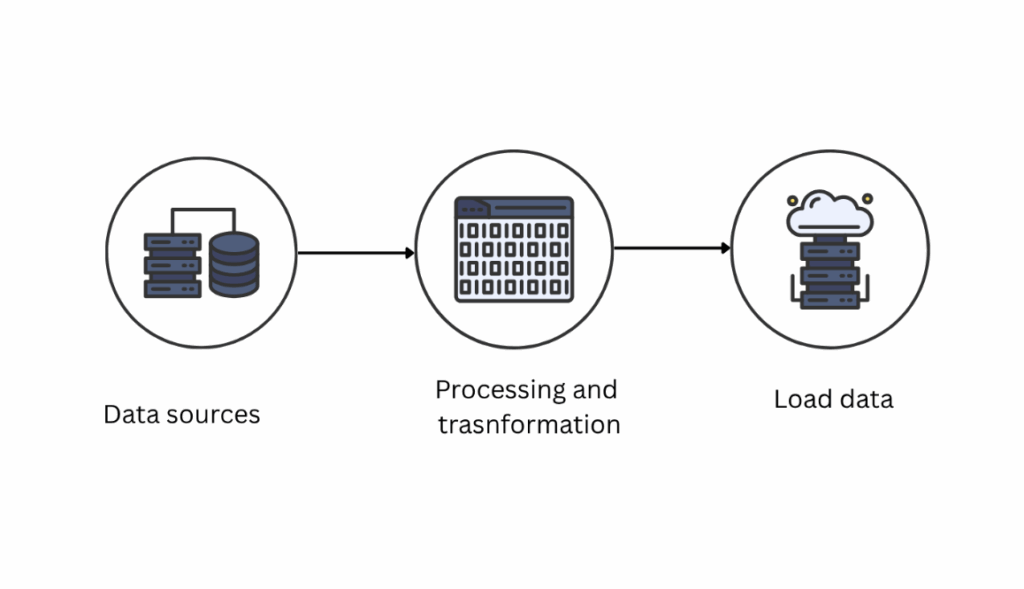
This is one of the most common data pipeline design patterns. ETL architecture is the traditional approach in which the data is extracted from the source, transformed in the pipeline, and then loaded into the destination. Most traditional systems and data warehousing follow this model. It works well for structured data or transformation logic that doesn’t need to change often.
2. ELT Pipeline Pattern
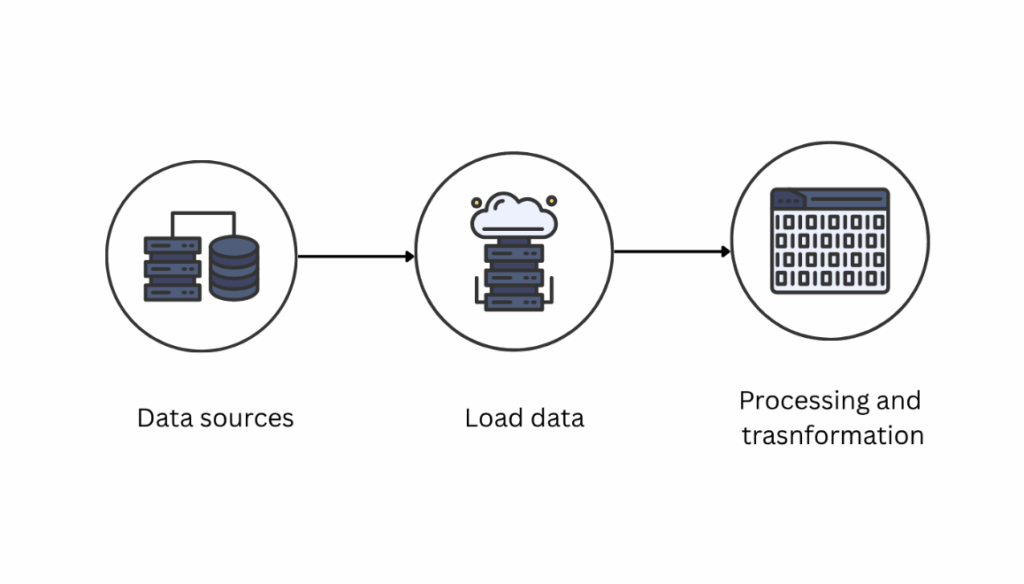
Modern warehouses follow the ELT pipeline pattern, which extracts the data from different sources, loads the raw data into the storage, and then transforms the data. This approach keeps the raw data in its original form for reprocessing and makes transformations more transparent.
3. Data Lake Architecture
Data Lake architecture stores all data (raw, semi-structured, and unstructured) in object storage first and processes it later. It’s commonly used by organizations that want to preserve all historical data and decide later what to analyze.
4. Microservices-Based Pipelines
Microservices-based architecture breaks pipelines into smaller, independent services instead of one monolithic pipeline. The decoupled services or components can be updated, scaled, or replaced without affecting the entire workflow. These pipelines rely on API calls or message queues like Kafka for data movement.
5. Event-Driven Architecture
In event-driven architecture, pipelines react to events in real-time. For example, when a user completes a transaction or clicks the sign-up button, that event triggers the pipeline. The architecture makes systems more responsive and eliminates the need for scheduled jobs.
Tools like Kafka, AWS EventBridge, and Google Pub/Sub are great for implementing event-driven architecture.
Data Pipeline Architecture Examples (Real-World Scenarios)
Example 1: SaaS Analytics Pipeline
SaaS companies often want to analyze and understand how users interact with their product. In a real-world SaaS analytics pipeline, a streaming ingestion layer with tools like Kafka collects user events continuously, such as button clicks and feature usage. The data is then loaded into a data warehouse in batches, such as every few seconds or minutes.
Since the stored data is still raw, an SQL-based transformation tool like dbt (data build tool) is used to clean the data, join datasets, and model raw events in fact and dimension tables. Finally, a BI tool, such as Looker, queries data using SQL and builds dashboards for analysis.
Example 2: Real-Time Recommendation System
Many e-commerce platforms show real-time recommendations to personalize the user experience. In such a data pipeline, a streaming ingestion layer collects user events like clicks, searches, and cart additions continuously using Kafka or a similar tool.
A stream processing engine, such as Apache Flink, processes these events in real-time and performs computations like tracking recent activity to create user feature vectors. These features are written to a low-latency feature store, from which a machine learning model can read data within milliseconds to provide personalized product suggestions
Example 3: AI / LLM Data Pipeline
Organizations building applications with large language models need specialized pipelines for unstructured data. The pipeline flow is very different from traditional analytics.
These pipelines start by ingesting diverse unstructured sources, such as documents, emails, PDFs, support tickets, and web content. The raw data then goes through preprocessing, where text is extracted, cleaned, and broken into smaller chunks so it can be handled efficiently by downstream systems.
Embedding models then convert these text chunks into vector representations, which are stored in specialized vector databases such as Pinecone or Weaviate for similarity search. The stored data is used in inference pipelines, usually through Retrieval-Augmented Generation (RAG), to pass the data to the LLM for accurate response generation.
However, this workflow is pretty complex. Platforms like DagFlux make such pipelines simpler. For example, Dagflux is a data workflow platform that handles ingestion, preprocessing, and transformation without requiring custom code. You can connect your data sources and describe your pipeline in plain language. The platform then builds and runs the workflow for you.
Best Practices for Designing Data Pipeline Architecture
Best practices for data pipeline architecture design include:
Encrypt data in transit and at rest, and apply role-based access controls at the storage layer. It’s also important to log access to sensitive data.
Design your data pipeline architecture for scalability. Cloud-native infrastructure, such as managed services on AWS or Google Cloud, makes it easier to scale compute and storage without needing to buy more hardware.
Pipelines can fail, so they should be designed with fault tolerance. Implement retries and backups so that a single failure doesn’t corrupt downstream data or require a complete rerun.
Validate data quality at every stage. Add schema checks, null rate monitoring, and anomaly detection at ingestion and after transformation.
Track pipeline performance by tracking key metrics and setting up alerts for failures.
Tools & Technologies for Data Pipeline Architecture
Data pipeline architecture uses various tools and technologies for different stages and layers. Here are the most commonly used tools:
DagFlux
DagFlux simplifies data pipelines for organizations building AI and LLM-based applications. It provides a drag-and-drop visual builder and an AI assistant to build pipelines and workflows, which removes the complexity of managing multi-step ingestion, preprocessing, and embedding workflows.
Apache Airflow
Apache Airflow is a widely used orchestration tool. It defines workflows as directed acyclic graphs (DAGs) and handles scheduling, retries, and monitoring.
Apache Kafka
Apache Kafka works as a distributed event streaming platform, and it can efficiently handle high-throughput, real-time data feeds.
Cloud Platforms (AWS and Google Cloud)
AWS provides a variety of tools that make data pipelines easier. For example, we can use S3 for storage, Glue for ETL, Kinesis for streaming, and Redshift for warehousing. Google Cloud is another good option. It provides BigQuery for analytics, Dataflow for batch or streaming, and Pub/Sub for messaging.
Challenges in Data Pipeline Architecture
Common challenges include:
- Data silos are one of the biggest problems, especially when teams use separate data stores without integration.
- Batch pipelines cause issues when systems expect fresh or real-time data.
- Processing layers in data pipeline architecture often break when data volume increases.
- Traditional pipeline tools are designed for structured data. Handling unstructured data is a bit complex.
- Maintaining pipelines is challenging. Schema changes, source API updates, and business logic shifts all require continuous attention.
Trends in Data Pipeline Architecture (2026)
Modern data pipeline architectures no longer just move structured data between systems. They’re ingesting unstructured content, running embedding models, and feeding vector databases. Streaming pipelines with micro-batching are becoming more common now.
Instead of using an all-in-one data platform, teams are now using specialized tools for each layer. Low-code and automation tools are also becoming common, making things easier for teams without deep data engineering resources.
Conclusion
Data pipeline architecture is essential for modern systems. There are different types of data pipeline architecture designs and patterns. The right one depends on your data sources, latency requirements, team size, and how you intend to use the data. It’s important to choose the right architecture based on your use case and requirements instead of what’s trending. That said, modern data workloads, especially those involving AI and unstructured data, require modern tools like DagFlux that are specially built for such workflows.
FAQs
What is data pipeline architecture?
Data pipeline architecture provides the blueprint for how the data is transferred and transformed from different sources to the destination.
What is the difference between ETL and ELT architecture?
ETL (Extract, Transform, Load) transforms data before loading it into the warehouse, whereas ELT (Extract, Load, Transform) loads raw data first and transforms it inside the warehouse using SQL-based tools.
What is Lambda vs Kappa architecture?
Lambda architecture runs separate batch and speed processing layers in parallel. Kappa architecture simplifies this by using a single streaming layer for all data, including historical and real-time data.
Which architecture is best for real-time data?
Streaming or Kappa architecture is best suited for real-time data. Event-driven pipelines using tools like Apache Kafka allow data to be processed as it arrives. Lambda is also an option when you need both real-time and reliable historical processing.
What tools are used in data pipeline architecture?
Modern data pipeline architecture uses various tools for different stages. Apache Airflow is widely used for orchestration, Apache Kafka for streaming, AWS and Google Cloud for cloud infrastructure, Snowflake, BigQuery, and Redshift for warehousing, and dbt for transformation. Tools like DagFlux are also used for AI-based pipelines.